Operations & Troubleshooting
System Properties
x_a46gh_squidx.allowAclOverride
Controls whether Squid bypasses ServiceNow ACLs for predefined configurations.
| Value | Behavior | Recommended |
|---|---|---|
false (default) | ACLs enforced | No |
true | ACLs bypassed | Yes |
arc46 cannot provide support unless this property is set to true.
Why bypass ACLs? When ACLs deny access, ServiceNow silently omits records — no error, no warning, just missing data. For mission-critical integrations, this is dangerous.
See ServiceNow ACLs and Squid for the full explanation of this security design decision.
x_a46gh_squidx.useScopedCache
Controls whether Squid uses scoped caches. Squid is installed with this property set to true.
Scoped caches store reference configurations and view metadata between requests, reducing execution time by ~100ms per request and lowering database load.
Scoped Caches
Squid utilizes ServiceNow Scoped Caches to minimize the overhead caused by repeatedly retrieving largely stable data from the database.
What Does Squid Cache?
Squid currently caches
-
configured References, i.e., the content of the tables
x_a46gh_squidx_referencesx_a46gh_squidx_references_predefined.
-
view metadata. Squid retrieves metadata (column name, data type, etc.) of all views used in configurations.
We expect to cache all configuration data in the near future.
Verifying Cache Performance
Squid caches are installed and configured by default.
You can check if they are working by adding the query parameter metaData
{
  "metadata": {
    ...,
    "config_cache": {
      "view_metadata": {
        "hits": 11,
        "misses": 0
      },
      "references": {
        "hits": 9,
        "misses": 0
      }
    },
    ...
  },
  ...
}
Troubleshooting Caches
If you consistently do not see any cache hits, check your instance for the following entries:
Scoped Caches (sys_scoped_cache)
These define the scoped caches.

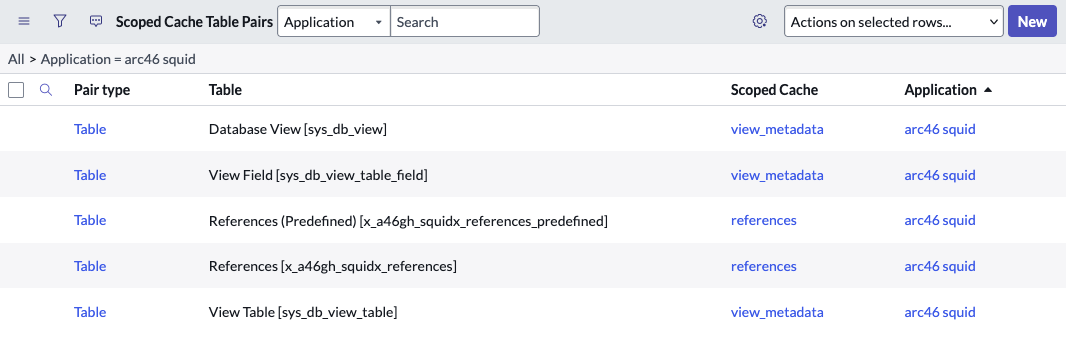
Scoped Cache Table Pairs (sys_scoped_cache_table_pair)
These define which tables trigger a cache invalidation.
System Property useScopedCache
This is the flag that enables the scoped cache.

Why Is Caching Necessary?
A fairly simple request can cause Squid to trigger 5-15 SQL queries for reference configurations as well as retrieving metadata for 10-20 views. This will easily cost 50-100ms. This is a significant overhead especially in the context of a devOps single entity request that should take less than 100 ms overall. (You won't notice any delay when executing a massive request taking 5-10 minutes, but those are not our only use cases.)
Caching reduces execution time by about 100 ms as well as reducing database load per request.
ServiceNow does not allow script includes to hold state. A script include is reinitialized on each and every call.
Squid is such a script include. The only way to hold data between requests is to use a scoped cache.
Logging
Debug Flags
Squid supports the following publicly documented debug flags:
constructorgeneralInfo
Further debug flags are available if required for debugging purposes. Please contact Support if you believe you have a problem that would require further log statements.
Squid supports two ways of determining what log statements should be written.
System properties
System properties determine what log statements are written for each and every request. All Squid debug flags are
prefixed with x_a46gh_squidx.debug.
HTTP request query parameter
The caller may request logs for a specific request by adding a request parameter debug=constructor,generalInfo.
Log Timestamp
ServiceNow only supports a granularity of seconds for the Create column. This is often confusing as the execution
order of log statements is no longer accurate.
Squid therefore prefixes all log statements with the current timestamp in ms resolution, e.g.

Sorting by Message will result in a correct ordering of log statements.
Please be advised that the timestamp Squid prefixes its log statements with is in the timezone of the caller! This is seldom a problem. Squid callers are mainly technical accounts in sync with the timezone of the ServiceNow instance. If the (a) caller does have another timezone configured, this will probably be a source of confusion.