ServiceNow Configuration for Squid
This guide covers ServiceNow platform settings that affect Squid API performance. These settings require ServiceNow administrator access.
For background on why these settings matter, see API Throughput. For client-side configuration, see API Client Configuration.
Transaction Quota Rules
Transaction quotas limit individual request duration, not concurrent request capacity. However, this is often the first issue encountered when deploying Squid—queries get killed before they complete.
Transaction quota rules limit how long API requests can run before being cancelled. This is critical for Squid—queries on large datasets routinely take 5-15 minutes, far exceeding default limits.
The Problem
The REST and JSON Catch All quota rule applies to Squid API requests. Its default limit of 300 seconds (5 minutes) is insufficient for large datasets—Squid queries routinely take 10-15 minutes.
When a transaction exceeds its quota, ServiceNow cancels it with:
Transaction cancelled: maximum execution time exceeded. The response JSON will be truncated or empty.
Recommended Configuration
Navigate to System Definition → Transaction Quota Rules and locate the "REST and JSON Catch All" rule:
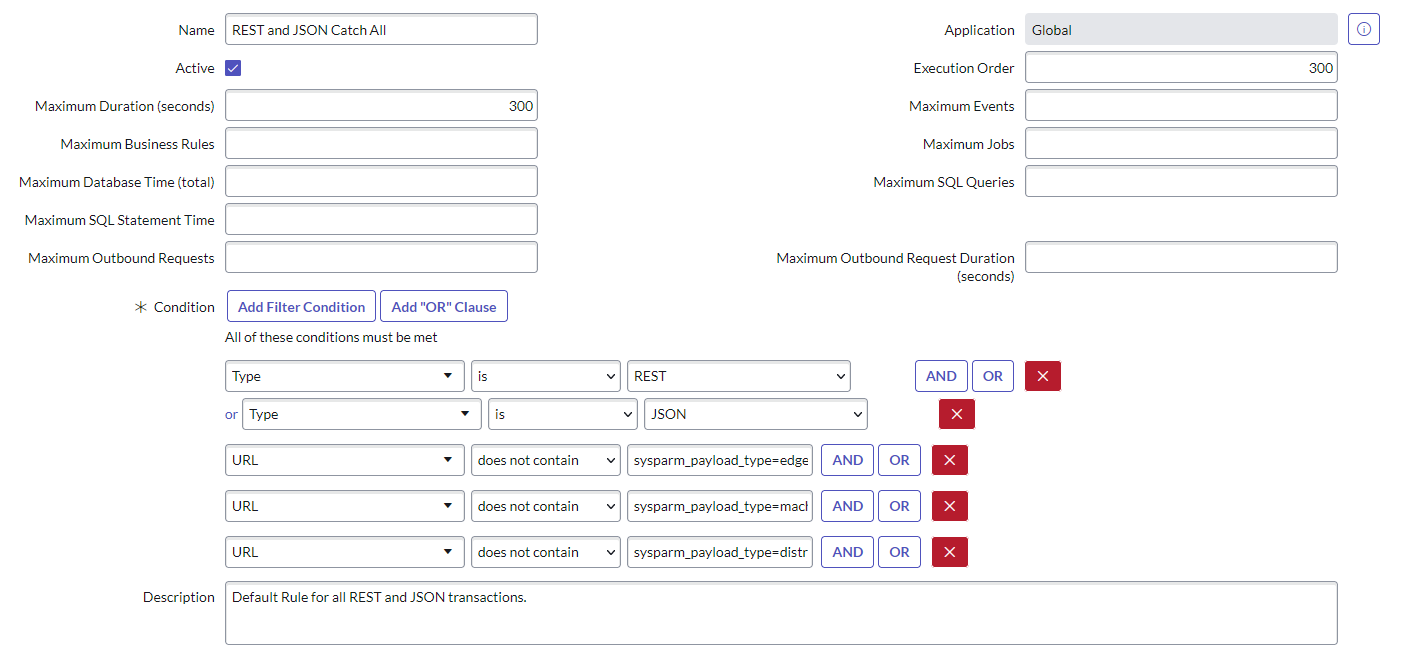
| Field | Default | Recommended for Squid |
|---|---|---|
| Maximum Duration (seconds) | 300 | 900 (15 minutes) |
For very large datasets, consider 1800 seconds (30 minutes).
Multiple quota rules can match a single request. ServiceNow evaluates all matching rules and applies the most
restrictive limit. Ensure no other rules impose shorter limits on the Squid API path (/api/x_a46gh_squidx/*).
Creating a Squid-Specific Rule
For precise control, create a dedicated quota rule for Squid:
- Navigate to System Definition → Transaction Quota Rules
- Click New
- Configure:
| Field | Value |
|---|---|
| Name | Squid API request timeout |
| Active | true |
| REST | true |
| URL contains string | /api/x_a46gh_squidx/ |
| Maximum duration | 900 (or higher) |
| Order | 50 (lower than catch-all rules) |
See ServiceNow KB0866547 for additional guidance.
Session Timeout Configuration
ServiceNow maintains separate timeout settings for integration sessions versus UI sessions. Proper configuration prevents session accumulation while allowing reasonable session lifetimes.
Relevant System Properties
| Property | Purpose | Default |
|---|---|---|
glide.ui.session_timeout | UI session inactive timeout | 30 minutes |
glide.integration.session_timeout | Integration session inactive timeout | 1-5 minutes |
glide.ui.active.session.life_span | Maximum UI session lifetime | 1440 minutes (24 hours) |
glide.integrations.active.session.life_span | Maximum integration session lifetime | Must exceed inactive timeout |
Integration Session Timeout
Since Fuji Patch 7, ServiceNow uses a separate, shorter timeout for integration sessions. This mitigates memory pressure from stateless API patterns that create new sessions per request.
The shorter integration timeout (typically 5 minutes) means sessions from API traffic expire quickly, preventing accumulation. This is beneficial for Squid integrations that disable cookie persistence.
Session Memory Impact
Each session object uses approximately 20KB of memory. With a 5-minute integration timeout:
Sessions per node ≈ (timeout_minutes × 60 × requests_per_second) ÷ node_count
Example: 5-minute timeout × 60 seconds × 5 req/sec ÷ 4 nodes = 375 sessions per node—well within acceptable limits.
Semaphore Architecture
ServiceNow controls concurrent API transactions through semaphore pools. Understanding these limits helps diagnose throughput issues.
API_INT Semaphore Pool
REST API requests use the API_INT semaphore pool:
| Setting | Default | Description |
|---|---|---|
| Active threads | 4 | Concurrent requests processing |
| Queue depth | 50 | Requests waiting for a thread |
| Total capacity | 54 per node | Maximum concurrent + queued |
When the queue is full, additional requests receive HTTP 429 Too Many Requests.
Cross-Instance Capacity
Multi-node instances multiply capacity. A 4-node cluster handles:
- 16 concurrent API requests (4 × 4 active threads)
- 200 queued requests (4 × 50 queue depth)
MID Server ECC queue polling consumes API_INT semaphores. Heavy Discovery or orchestration workloads compete directly with external API consumers for the same limited pool.
Modifying Semaphore Limits
Semaphore configuration changes require a ServiceNow HI ticket. Before requesting changes, document:
- Current utilization (see Monitoring)
- Business justification
- Expected throughput requirements
Rate Limit Rules
Rate limit rules control requests per hour per user or role. Unlike semaphores (concurrency), rate limits control throughput over time.
Checking Existing Rules
Navigate to System Web Services → REST → Rate Limit Rules to view configured limits.
Rate limits vary by instance size and licensing:
| Instance Size | Typical Limit | Burst Capacity |
|---|---|---|
| Small | ~25,000/hour | ~7/second |
| Medium | ~50,000/hour | ~14/second |
| Large Enterprise | 100,000+/hour | ~28+/second |
Creating a Squid Service Account Rule
If rate limits affect your Squid integration, consider a dedicated rule:
- Navigate to System Web Services → REST → Rate Limit Rules
- Click New
- Configure:
| Field | Value |
|---|---|
| REST API | Table API (or specific APIs) |
| User | squid_integration_user |
| Maximum requests | (appropriate limit) |
Priority: Single user rules override role-based rules, which override global rules.
Rate limit counts synchronize to the database every 30 seconds. Newly created rules may not take effect immediately.
Monitoring Platform Health
stats.do: Real-Time Semaphore Status
Access https://<instance>.service-now.com/stats.do to view current semaphore utilization:
**API_INT**
Available semaphores: 3
Queue depth: 0
Queue age: 0:00:00.000
Max queue depth: 44
Queue depth limit: 50
In use semaphores:
0:BDBC10AC47EA... #9484563 /api/now/v2/table/sys_history_line (API_INT-thread-2) (0:00:27.168)
Maximum transaction concurrency: 4
429 rejections: 4
Warning Thresholds
| Metric | Warning Level | Action |
|---|---|---|
| Available semaphores | <25% of max | Investigate concurrent load |
| Queue depth | >50% of limit | Consider request throttling |
| Queue age | >30 seconds | Requests waiting too long |
| 429 rejections | Any increase | Clients being rate-limited |
xmlstats.do: Programmatic Monitoring
For automated monitoring, use https://<instance>.service-now.com/xmlstats.do?include=semaphores,transactions
Key Tables for Troubleshooting
| Table | Purpose | Navigation |
|---|---|---|
syslog_transaction | Transaction logs with timing | System Logs → Transactions |
sys_rate_limit_violations | Rate limit violation records | — |
sys_cluster_state | Node health including stats | — |
Identifying Stuck Transactions
Long-running transactions visible in stats.do (e.g., durations like 29:30:07.809) may indicate issues:
- Click the thread link in stats.do to view the stack trace
- Refresh—if unchanged, the thread may be stuck
- To terminate: System Diagnostics → Active Transactions (All Nodes), right-click and select Kill
Service Account Configuration
Dedicated service accounts for Squid integrations enable better troubleshooting and access control.
Creating a Squid Service Account
- Create a new user (e.g.,
squid_integration_cmdb) - Assign required roles:
x_a46gh_squidx.rest— API accessx_a46gh_squidx.defaultAccess— Predefined configurations- Additional configuration-specific roles as needed
- Do NOT assign
adminrole - Use local authentication (not LDAP/SSO) to avoid remote auth overhead
Naming Convention
squid_{purpose}_{system}

Examples:
- squid_cmdb_export
- squid_asset_sync_sccm
- squid_ci_monitoring
One Account Per Integration
Use separate service accounts for each integration system. Benefits:
- Isolated troubleshooting
- Emergency lockout capability
- Clear audit trail
Session Synchronization Reference
ServiceNow's session synchronization ("session synch") processes only one transaction per session at a time. This is why API clients should disable cookie persistence.
Session Queue Thresholds
| Condition | Threshold | Result |
|---|---|---|
| Queued transactions | >10 per session (Tokyo+) | HTTP 202 returned |
| Transaction duration | >30 seconds | HTTP 202 for additional requests |
HTTP 202 means the request was not processed—data is silently dropped.
System Property
| Property | Purpose | Default |
|---|---|---|
com.glide.request.max_waiters | Max queued transactions per session | 10 (Tokyo+) |
Modifying max_waiters or queue size properties should be discussed with ServiceNow Support before implementation.
Maximum View Records
The system property glide.db.max_view_records controls the maximum number of rows returned when querying a database
view. The default value is 10,000.
Source: Configuring the number of records to return
If this threshold is breached, Squid logs a warning and includes it in the response:
{
  "metadata": {
    ...,
    "row_count": 10001,
    "warnings": [
      "The current rowCount of 10001 is greater than the value set as system property 'glide.db.max_view_records': 10000. Records could be missing. Please check the amount of records you are expecting."
    ]
  },
  ...
}
If you see these warnings, increase the glide.db.max_view_records value or restrict your queries.
Squid intentionally does not sort or page data. What entities are returned if this threshold is breached is totally arbitrary.
Squid attempts to deliver as reliable and reproducible data as possible. Data in dynamic systems like ServiceNow is a moving target. Pagination implies that data is returned at different points in time and as pagination would only come into play with large data amounts every request/response cycle would take several minutes. As Squid is stateless, we would need to reexecute the query against the then current state of data.
Added data in a previous page? Get redundant data in the current page.
Removed data in a previous page? Data is missing in the current page.
Hey, Squid, you're inconsistent! As that is something we definitely do not want to do here, we do not support pagination.
Configuration Checklist
For optimal Squid performance, verify these settings:
- Transaction quota rule allows 900+ seconds for Squid API path
- Integration session timeout is configured (5 minutes typical)
- Dedicated service account created with appropriate roles
- Rate limit rules accommodate expected Squid throughput
- Monitoring alerts configured for semaphore exhaustion
-
glide.db.max_view_recordsset high enough for your largest dataset (see above) -
x_a46gh_squidx.allowAclOverrideset totrue( see Operations)
Related Topics
- API Throughput — Why these settings matter
- API Client Configuration — Client-side settings
- Operations — Squid system properties, caching, and logging
- Authorization — Role configuration
- Authentication — Service account best practices